 Mac
7798a054a0
Mac
7798a054a0
Porting over changes from my itsmemac/VU-Pterodactyl
- Added server frequency variable
- disabled auto update temporarily (Is causing issue with VU auto-updater overwriting files in different directory causing server to not start. Manual update by downloading and replacing the files works best as of now)
Venice Unleashed
Experience Battlefield 3 like never before VU /vi:ju:/ is a community-oriented Battlefield 3 modding platform that gives you back control of your gaming experience.
PORTS
- 3 Ports are required to run Venice Unleashed servers
- Primary port is automatically assigned as game port for the server
- Harmony services and RCON needs port assigned in the Startup tab
| Port | Default Ports |
|---|---|
| Game | Primary Port of server |
| Harmony | 7948 |
| RCON | 47200 |
EGG VARIANT
There is 2 variants of Eggs for Venice Unleashed
- With mount
- Without mount
WITH MOUNT
In order to reduce size of server, /bf3 directory is shared with multiple servers rather than having it in root directory of each server.
This type of egg uses mount feature of Pterodactyl where you need to create a mount for /bf3 directory and mount it to server. Refer to this link for more info on how to create mounts in Pterodactyl Panel
Below example shows BF3 game files mount hosted in source path /var/lib/pterodactyl/mounts/bf3 which has required BF3 game files

Recommended disk size : 3GB (Uses about 1.6GB after initial startup without any mods)
WITHOUT MOUNT
This type of server uses more than 35GB in space where you have to upload the BF3 game files for each server under /bf3 directory.
Recommended disk size : 45GB (Including BF3 game files which is ~35GB. Can vary between regions)
NOTES
- Server takes sometime to mark as running status since server has to connect to Zeus backend for listing. Wait for this message in console [Game successfully registered with Zeus. The server is now accepting connections.]
- Email and Password should be provided in startup before starting the server for 1st time to activate the instance (Only required for initial startup. Once the server is activated, you can remove your credentials and replace with default credentials [example@example.com|Password@123])
- If you start the server with default credentials, server will create
activatedfile in your server directory with default credentials and server will not work. Deleteactivatedfile, provide your credentials in startup and restart server to activate. - 2FA should be disabled in your EA Account to successfully verify the installation (You can enable 2FA after activation)
- Mount should be linked to the egg for mounts to work (Edit the mount and assign it to VU with mount Egg as shown in below image)
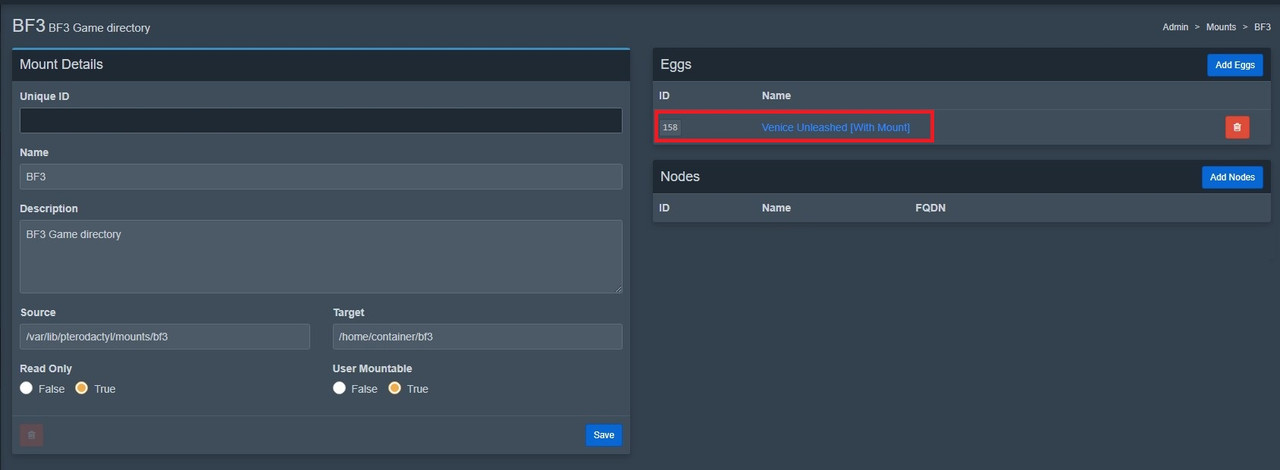
- Mount should also be mounted in mount tab of server settings for each servers you wish to have mount available
- Wine Latest is the preferred image which uses Parker's latest wine generic image
- Kindly ignore "steam user is not set." message in console during startup (this is used for steam games only).